Paste a public video or Shorts link to convert YouTube to text. Read the full transcript, then copy or download it.
No login required
Ready in seconds
180+ translation options
Copy-ready text
How to get a YouTube transcript
Use this online YouTube transcript extractor to bring the spoken words from a public video or Short into one readable result.
1
Copy the video or Shorts link
Open the YouTube video or Short, select Share, then Copy. You can also copy the URL from your browser. Standard watch links, youtu.be share links and Shorts links are supported. Choose Bulk transcribe when you have several videos.
2
Paste and get the transcript
Paste the link above and select Get transcript. WiseTranscript retrieves an available YouTube transcript from the source. Read the result below the input and use available timestamps to check passages against the video.
3
Copy, download or translate
Copy the YouTube transcript or download TXT for notes and quotes. Export SRT or VTT when usable timing is available. For another language, sign in and choose a target from the Original menu above your transcript.
Which YouTube links work
Standard video links: youtube.com/watch?v=…
Share links: youtu.be/…
YouTube Shorts: youtube.com/shorts/…
Supported public channel links, through Bulk transcribe
Have a video saved on your device? Choose Upload file to transcribe an audio or video file. Sign-in required.
A few limits to keep in mind
Private, deleted, members-only or restricted videos
Active live streams and inaccessible recordings
Videos beyond the supported duration
Sources with no usable transcript or accessible speech
Transcribes spoken words, not text shown only on screen.
From YouTube captions to a transcript you can keep
YouTube’s Show transcript helps you read along when captions are available. WiseTranscript brings the available words into a workspace for copying, text downloads and subtitle exports.
Start with the video
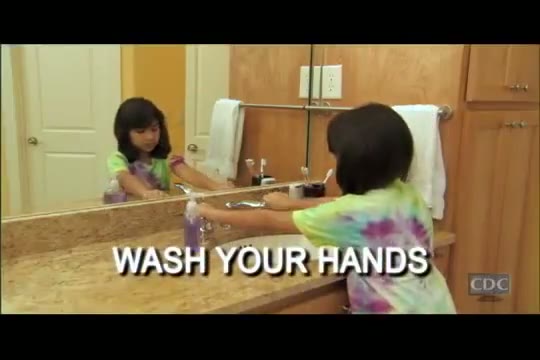
YouTube video
Keep the words together
Transcript excerpt
00:00
Wash your hands!
00:03
First you need some soap, then scrub for 20 seconds.
00:07
If you don’t have a clock near you, then sing the ABC song.
Read without collecting each line. Follow the available transcript at your own pace instead of pausing to type.
Check a quote in context. Use available timestamps to revisit an explanation, hook or product claim.
Take the text into your work. Copy passages into notes, download TXT or export subtitles when usable timing is available.
Copy or download your YouTube transcript
Save your YouTube transcript as text for notes, quotes or a draft. Copy the words directly, or download TXT, SRT or VTT from the same result.
TXT
Plain text for reading, collecting quotes and reusing your transcript in notes, briefs or drafts.
Transcript.txt
Excerpt · 00:00
Wash your hands!
00:03
First you need some soap, then scrub for 20 seconds.
00:07
If you don’t have a clock near you, then sing the ABC song.
SRT
Timed subtitle cues for compatible video editors, when usable timestamps are available.
Transcript.srt
Excerpt · 00:00
Wash your hands!
00:03
First you need some soap, then scrub for 20 seconds.
00:07
If you don’t have a clock near you, then sing the ABC song.
VTT
Timed captions for compatible web players, when usable timestamps are available.
Transcript.vtt
WEBVTT
Wash your hands!
00:03
First you need some soap, then scrub for 20 seconds.
00:07
If you don’t have a clock near you, then sing the ABC song.
If a result has only approximate timing or no timestamps, use TXT or copy the text. SRT and VTT are available only when the result includes usable timing. Review the wording and timing before publishing subtitles.
Practical uses for YouTube transcripts
Work with the words from tutorials, interviews and Shorts. A YouTube transcript gives you a readable source for notes, quotes and your next draft, without repeatedly pausing to type.
Creators & Shorts writers
Study the spoken hook and structure of an existing Short. Read the words together before drafting your own original script.
Copy useful passages into your reference notes
Repurpose your own video transcripts into posts or newsletters
Researchers & journalists
A quote needs its context. Read an interview or explanation, then use available timestamps to check the passage in the source video.
Keep quotes alongside their source link
Search downloaded TXT files in your own research tools
Marketers & product teams
Review a demo, review video or customer interview without relying on memory. Collect the exact spoken points for a more useful brief.
Compare product claims and explanations across videos
Bring selected passages into a research document or spreadsheet
Teams & agencies
Several videos belong to the same project. Review a supported channel or multiple links before choosing which videos to transcribe.
Sign in to review and select up to 50 available videos
Keep a separate transcript and source for each selected video
Students & language learners
Learn from a tutorial at your own pace. Read the explanation again, collect definitions and revisit the parts that need another look.
Download the YouTube transcript as TXT for study notes
Translate a ready transcript and review important terms against the original
Editors & subtitle creators
Find a spoken line before making a cut. A transcript with usable timestamps helps you return to the relevant moment.
Copy text for an edit brief or export SRT and VTT
Review wording and timing in your editor before sharing subtitles
Why choose WiseTranscript for YouTube transcripts?
Compare how you get a YouTube transcript: from pasting a link to copying text, downloading subtitles, translating and transcribing multiple videos.
YouTube transcription workflows compared
Feature
WiseTranscript
Tactiq
Otter.ai
Rev
Notta
Descript
YouTube link to text
Paste a video or Shorts link
Paste a YouTube URL
Import an audio or video file
Upload a file or supported media URL
Paste a YouTube URL
Import the video into a project
Getting started
Free daily allowance. Try without signing up.
No email for the transcript tool
Free account; limited file imports
Free monthly AI minutes; account required
Free YouTube web tool; no signup
Free account; editor workflow
Copy & download
Copy text; TXT, SRT & VTT with usable timing
Copy text; TXT download
TXT on Basic; SRT on paid plans
TXT, SRT & VTT
Free web transcript; workspace exports on Pro+
TXT, SRT & VTT from the editor
Transcript translation
187 language & regional options; copy & export
Separate AI workflows
AI Chat translation workflow
Side-by-side translation on Pro and above
40+ languages on Pro and above
Captions in 61 languages
Multiple videos
Review up to 50 videos from links or a supported channel
Single-video transcript form
File-import workspace
Multi-file and ZIP upload
Link and file imports in the workspace
Multi-file editing projects
Main workflow
Public link to transcript, exports and saved results
YouTube text extraction and meeting tools
Meetings and conversation notes
AI and human transcription services
Meeting notes and video transcription
Transcript-based video editing
Features and availability may vary by plan and change over time. Check each provider for the latest details.
YouTube transcript FAQs
Answers for this tool.
How do I get a transcript from a YouTube video?
Copy the public video URL, paste it above and select Get transcript. Read the available text below the input, then copy it or choose a download format. On YouTube itself, videos with captions may also offer Show transcript in the video description.
Is this YouTube transcript generator free?
Yes. You get 3 free credits each UTC day. Transcription uses 1 credit per started 5 minutes of each video. Unused daily credits expire at 00:00 UTC. Copying or downloading an available result costs no extra credits. Optional credit packs are one-time purchases, with no subscription or automatic renewal.
Can I get a YouTube transcript without signing up?
Your first successful single-video transcript of the UTC day can be viewed, copied and downloaded without signing up, within your available credits. After that, you can process another video with remaining credits, but need to sign in to unlock its full text and exports. Signing in keeps your existing daily usage; it does not add another free allowance. No YouTube login, app or browser extension is needed.
How long can a YouTube video be?
Videos can be up to 30 minutes long, and your available credits must cover the full video. If you need more credits, add a credit pack or choose a shorter video. The tool does not cut the result down to a free preview.
Can I get a YouTube Shorts transcript?
Yes. Paste a public youtube.com/shorts/ link into the same input and select Get transcript. Shorts use the same result view, copy controls and available downloads as regular videos. Availability still depends on source access and a usable transcript.
How do I copy a YouTube transcript on my phone?
Open this page in your mobile browser, paste the video or Shorts link and select Get transcript. Select Copy text on the available result, or open Export options and choose Export TXT. You do not need to install an app or browser extension.
Can I download a YouTube transcript with timestamps?
Yes. Download TXT for readable text and notes, or SRT and VTT for subtitles when usable timestamps are available. You can also copy the transcript without downloading a file. If timing is approximate or unavailable, use TXT or copy the text. Subtitle files are separate downloads; the tool does not burn captions into your video.
Can I get a YouTube transcript without timestamps?
Yes. Select Copy text to copy the words without timestamps, or export TXT for a plain-text file. Open Copy options for simple or detailed timestamped text. Choose SRT or VTT when you need timed subtitle cues. Copying and exporting do not transcribe the video again.
What if YouTube has no Show transcript option or no captions?
Show transcript depends on captions being available on YouTube. WiseTranscript also depends on source access and usable content, so a link without available captions may fail. If you own the recording or have permission to process it, sign in and try Upload file for a supported audio or video file. Link transcription without captions is not guaranteed.
Can I translate the transcript into another language?
Yes. Once your transcript is ready, sign in and choose a target language from the Original menu above it. The translation menu includes 187 language and regional options. Translation uses 1 credit per started 5 minutes of the source video, per target language. Reopening an existing translation uses no extra credits. Review translated wording before sharing it.
Can I bulk transcribe a YouTube channel or playlist?
Sign in and choose Bulk transcribe to submit multiple video links or a supported public channel link. Review the available videos and select up to 50 before confirming. Each video has its own transcript and credit charge. Playlist links are not supported directly; paste the individual video links instead. A channel import does not guarantee every video ever posted.
Can I upload a video or transcribe a live-stream recording?
Sign in and choose Upload file for a supported recording you are allowed to process: MP3, M4A, WAV, MP4, MOV or WEBM, up to 100 MB and 30 minutes. An accessible published replay may work as a video link, but an active live stream cannot be transcribed in real time.
What is a YouTube transcript or YT transcript?
A YouTube transcript, also called a YT transcript, is readable text of the words spoken in a video. It may include timestamps. It is different from a new video script or a shortened summary: the transcript keeps the available speech together for reading and reference.
Does the tool summarize YouTube videos or write a new script?
This page produces a transcript of existing speech. It does not automatically turn the video into a summary or generate a new script. You can copy the available transcript into your notes or another writing tool to make your own summary or draft.
How accurate is the transcript, and how long does it take?
Accuracy depends on the source captions, language, recording quality and clarity of speech. Names, slang, accents, overlapping voices and background music can cause errors. Processing time varies with video length, source access and demand. Review important wording and available timestamps against the original before quoting or publishing.
Do you store my videos and transcripts?
Unclaimed guest results expire at the next 00:00 UTC after creation. Sign in before that reset to save eligible results and start saving their original media to your account. Saved account transcripts, video copies, and covers remain subject to deletion and retention rules. Temporary upload originals are scheduled for deletion after 7 days; saved account copies are kept separately. Service providers process the data needed for your request. See our Privacy Policy for details.
Why could I not get a YouTube transcript?
The video may be private, deleted, restricted or blocked by YouTube. Captions may be unavailable or in an unusable language track, and audio access is not guaranteed. Supported duration, available credits or temporary service errors can also affect the request. Check its error message. If only the video preview fails, an available transcript can still be copied or downloaded.
Is it okay to transcribe someone else’s YouTube?
Transcribe videos you own or have permission to process. A public link does not grant reuse rights; respect the creator’s permissions and applicable platform terms.
Transcribe videos from other platforms
Have a video from another platform? Check its supported links and limits before you start.
A better transcription experience, update by update
See the latest improvements to how you transcribe, review and reuse video.
Review more videos before you transcribe
Bulk transcribe brings multiple links and supported creator sources into one selection. Review video covers and durations, then choose the videos you need.
A simpler path to your first transcript
Start with a public video link and read the available transcript below the input. Copy the words or download them from the same workspace.
Bring saved recordings into the same workflow
Upload an audio or video file when you already have the recording. Read and copy the transcript, or download TXT and available subtitle formats.